Exploring Data with pandas and Matplotlib
I use pandas and numpy for data wrangling and analysis, and matplotlib for plotting. The dataset covers immigration to Canada from 1980 to 2013, sourced from the United Nations. My focus is on hands-on exploration and visualization, not on following any course template or assignment.
Downloading and Preparing Data
Importing the main libraries:
# Author: Mohammad Sayem Chowdhury
import numpy as np
import pandas as pd
Now, I load the Canadian immigration dataset directly into a pandas DataFrame for analysis.
Download the dataset and read it into a pandas dataframe.
df_can = pd.read_excel('https://cf-courses-data.s3.us.cloud-object-storage.appdomain.cloud/IBMDeveloperSkillsNetwork-DV0101EN-SkillsNetwork/Data%20Files/Canada.xlsx',
                       sheet_name='Canada by Citizenship',
                       skiprows=range(20),
                       skipfooter=2
                      )

print('Data downloaded and read into a dataframe!')
Data downloaded and read into a dataframe!
Let's take a look at the first five items in our dataset.
df_can.head()
| Type | Coverage | OdName | AREA | AreaName | REG | RegName | DEV | DevName | 1980 | ... | 2004 | 2005 | 2006 | 2007 | 2008 | 2009 | 2010 | 2011 | 2012 | 2013 | |
|---|---|---|---|---|---|---|---|---|---|---|---|---|---|---|---|---|---|---|---|---|---|
| 0 | Immigrants | Foreigners | Afghanistan | 935 | Asia | 5501 | Southern Asia | 902 | Developing regions | 16 | ... | 2978 | 3436 | 3009 | 2652 | 2111 | 1746 | 1758 | 2203 | 2635 | 2004 |
| 1 | Immigrants | Foreigners | Albania | 908 | Europe | 925 | Southern Europe | 901 | Developed regions | 1 | ... | 1450 | 1223 | 856 | 702 | 560 | 716 | 561 | 539 | 620 | 603 |
| 2 | Immigrants | Foreigners | Algeria | 903 | Africa | 912 | Northern Africa | 902 | Developing regions | 80 | ... | 3616 | 3626 | 4807 | 3623 | 4005 | 5393 | 4752 | 4325 | 3774 | 4331 |
| 3 | Immigrants | Foreigners | American Samoa | 909 | Oceania | 957 | Polynesia | 902 | Developing regions | 0 | ... | 0 | 0 | 1 | 0 | 0 | 0 | 0 | 0 | 0 | 0 |
| 4 | Immigrants | Foreigners | Andorra | 908 | Europe | 925 | Southern Europe | 901 | Developed regions | 0 | ... | 0 | 0 | 1 | 1 | 0 | 0 | 0 | 0 | 1 | 1 |
5 rows × 43 columns
# print the dimensions of the dataframe
print(df_can.shape)
(195, 43)
Data Cleaning: My Approach
To make the visualizations easier, I made a few changes to the original dataset. I removed unnecessary columns, renamed some for clarity, and set the country name as the index. This way, I could quickly look up countries and calculate totals for my plots.
# clean up the dataset to remove unnecessary columns (eg. REG)
df_can.drop(['AREA', 'REG', 'DEV', 'Type', 'Coverage'], axis=1, inplace=True)

# let's rename the columns so that they make sense
df_can.rename(columns={'OdName':'Country', 'AreaName':'Continent','RegName':'Region'}, inplace=True)

# for sake of consistency, let's also make all column labels of type string
df_can.columns = list(map(str, df_can.columns))

# set the country name as index - useful for quickly looking up countries using .loc method
df_can.set_index('Country', inplace=True)

# add total column
df_can['Total'] = df_can.sum(axis=1)

# years that we will be using in this lesson - useful for plotting later on
years = list(map(str, range(1980, 2014)))
print('data dimensions:', df_can.shape)
data dimensions: (195, 38)
C:\Users\chysa\AppData\Local\Temp\ipykernel_14172\3015018611.py:14: FutureWarning: Dropping of nuisance columns in DataFrame reductions (with 'numeric_only=None') is deprecated; in a future version this will raise TypeError.  Select only valid columns before calling the reduction.
  df_can['Total'] = df_can.sum(axis=1)
Visualizing Data with Matplotlib
This is where the fun begins! I use Matplotlib to bring the numbers to life and see what patterns emerge from the data.
Import Matplotlib.
%matplotlib inline

import matplotlib as mpl
import matplotlib.pyplot as plt

mpl.style.use('ggplot') # optional: for ggplot-like style

# check for latest version of Matplotlib
print('Matplotlib version: ', mpl.__version__) # >= 2.0.0
Matplotlib version: 3.5.1
Pie Charts: Visualizing Proportions
Pie charts are a classic way to show proportions. I wanted to see how new immigrants to Canada were distributed by continent over time, so I used a pie chart to get a quick sense of the big picture.
Step 1: Gather data.
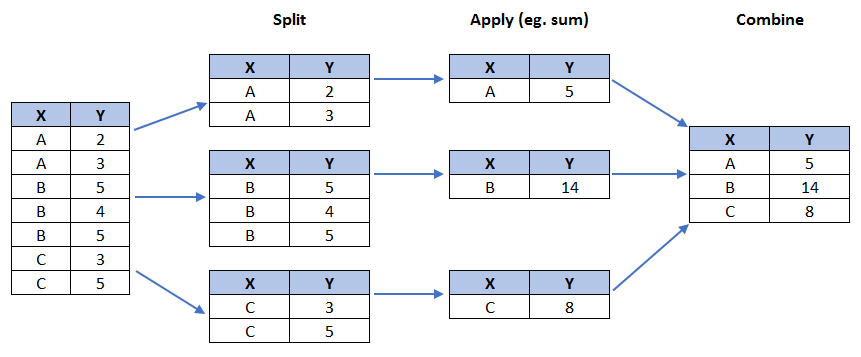
We will use pandas groupby method to summarize the immigration data by Continent. The general process of groupby involves the following steps:
- Split: Splitting the data into groups based on some criteria.
- Apply: Applying a function to each group independently: .sum() .count() .mean() .std() .aggregate() .apply() .etc..
- Combine: Combining the results into a data structure.
# group countries by continents and apply sum() function
df_continents = df_can.groupby('Continent', axis=0).sum()

# note: the output of the groupby method is a `groupby' object.
# we can not use it further until we apply a function (eg .sum())
print(type(df_can.groupby('Continent', axis=0)))

df_continents.head()
<class 'pandas.core.groupby.generic.DataFrameGroupBy'>
| 1980 | 1981 | 1982 | 1983 | 1984 | 1985 | 1986 | 1987 | 1988 | 1989 | ... | 2005 | 2006 | 2007 | 2008 | 2009 | 2010 | 2011 | 2012 | 2013 | Total | |
|---|---|---|---|---|---|---|---|---|---|---|---|---|---|---|---|---|---|---|---|---|---|
| Continent | |||||||||||||||||||||
| Africa | 3951 | 4363 | 3819 | 2671 | 2639 | 2650 | 3782 | 7494 | 7552 | 9894 | ... | 27523 | 29188 | 28284 | 29890 | 34534 | 40892 | 35441 | 38083 | 38543 | 618948 |
| Asia | 31025 | 34314 | 30214 | 24696 | 27274 | 23850 | 28739 | 43203 | 47454 | 60256 | ... | 159253 | 149054 | 133459 | 139894 | 141434 | 163845 | 146894 | 152218 | 155075 | 3317794 |
| Europe | 39760 | 44802 | 42720 | 24638 | 22287 | 20844 | 24370 | 46698 | 54726 | 60893 | ... | 35955 | 33053 | 33495 | 34692 | 35078 | 33425 | 26778 | 29177 | 28691 | 1410947 |
| Latin America and the Caribbean | 13081 | 15215 | 16769 | 15427 | 13678 | 15171 | 21179 | 28471 | 21924 | 25060 | ... | 24747 | 24676 | 26011 | 26547 | 26867 | 28818 | 27856 | 27173 | 24950 | 765148 |
| Northern America | 9378 | 10030 | 9074 | 7100 | 6661 | 6543 | 7074 | 7705 | 6469 | 6790 | ... | 8394 | 9613 | 9463 | 10190 | 8995 | 8142 | 7677 | 7892 | 8503 | 241142 |
5 rows × 35 columns
Step 2: Plot the data. We will pass in kind = 'pie' keyword, along with the following additional parameters:
autopct- is a string or function used to label the wedges with their numeric value. The label will be placed inside the wedge. If it is a format string, the label will befmt%pct.startangle- rotates the start of the pie chart by angle degrees counterclockwise from the x-axis.shadow- Draws a shadow beneath the pie (to give a 3D feel).
# autopct create %, start angle represent starting point
df_continents['Total'].plot(kind='pie',
                            figsize=(5, 6),
                            autopct='%1.1f%%', # add in percentages
                            startangle=90,     # start angle 90° (Africa)
                            shadow=True,       # add shadow
                            )

plt.title('Immigration to Canada by Continent [1980 - 2013]')
plt.axis('equal') # Sets the pie chart to look like a circle.

plt.show()

The above visual is not very clear, the numbers and text overlap in some instances. Let's make a few modifications to improve the visuals:
- Remove the text labels on the pie chart by passing in
legendand add it as a seperate legend usingplt.legend(). - Push out the percentages to sit just outside the pie chart by passing in
pctdistanceparameter. - Pass in a custom set of colors for continents by passing in
colorsparameter. - Explode the pie chart to emphasize the lowest three continents (Africa, North America, and Latin America and Carribbean) by pasing in
explodeparameter.
colors_list = ['gold', 'yellowgreen', 'lightcoral', 'lightskyblue', 'lightgreen', 'pink']
explode_list = [0.1, 0, 0, 0, 0.1, 0.1] # ratio for each continent with which to offset each wedge.

df_continents['Total'].plot(kind='pie',
                            figsize=(15, 6),
                            autopct='%1.1f%%',
                            startangle=90,
                            shadow=True,
                            labels=None,         # turn off labels on pie chart
                            pctdistance=1.12,    # the ratio between the center of each pie slice and the start of the text generated by autopct
                            colors=colors_list,  # add custom colors
                            explode=explode_list # 'explode' lowest 3 continents
                            )

# scale the title up by 12% to match pctdistance
plt.title('Immigration to Canada by Continent [1980 - 2013]', y=1.12)

plt.axis('equal')

# add legend
plt.legend(labels=df_continents.index, loc='upper left')

plt.show()

My Own Pie Chart Experiment
I was curious about the proportions of new immigrants by continent in 2013, so I created a pie chart for that year. I played with the explode values to make the chart more readable and visually appealing.
### type your answer here

explode_list = [0.0, 0, 0, 0.1, 0.1, 0.2] # ratio for each continent with which to offset each wedge.
df_continents['2013'].plot(kind='pie',
                            figsize=(15, 6),
                            autopct='%1.1f%%',
                            startangle=90,
                            shadow=True,
                            labels=None,                 # turn off labels on pie chart
                            pctdistance=1.12,            # the ratio between the pie center and start of text label
                            explode=explode_list         # 'explode' lowest 3 continents
                            )
# scale the title up by 12% to match pctdistance
plt.title('Immigration to Canada by Continent 2013', y=1.12)

plt.axis('equal')

# add legend
plt.legend(labels=df_continents.index, loc='upper left')
<matplotlib.legend.Legend at 0x236838c8cd0>

Click here for a sample python solution
    #The correct answer is:
    explode_list = [0.0, 0, 0, 0.1, 0.1, 0.2] # ratio for each continent with which to offset each wedge.

    df_continents['2013'].plot(kind='pie',
                                figsize=(15, 6),
                                autopct='%1.1f%%',
                                startangle=90,
                                shadow=True,
                                labels=None,                 # turn off labels on pie chart
                                pctdistance=1.12,            # the ratio between the pie center and start of text label
                                explode=explode_list         # 'explode' lowest 3 continents
                                )

    # scale the title up by 12% to match pctdistance
    plt.title('Immigration to Canada by Continent in 2013', y=1.12)
    plt.axis('equal')

    # add legend
    plt.legend(labels=df_continents.index, loc='upper left')

    # show plot
    plt.show()
Box Plots: Exploring Distributions
Box plots are a great way to see the spread and outliers in data. I used them to look at the distribution of immigrants from Japan, and then compared India and China to see how their trends differed.
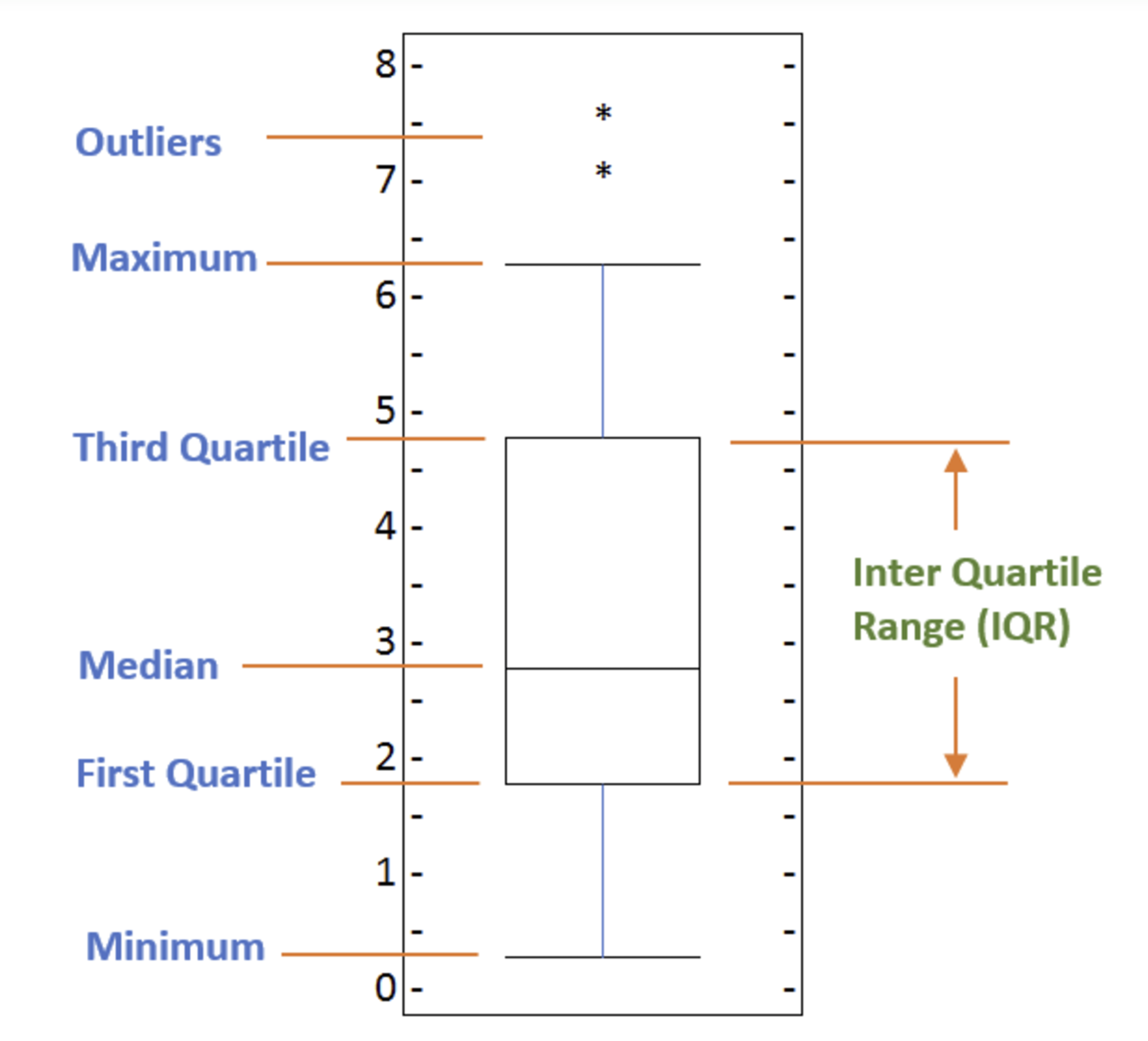
To make a box plot, we can use kind=box in plot method invoked on a pandas series or dataframe.
Let's plot the box plot for the Japanese immigrants between 1980 - 2013.
Step 1: Get the dataset. Even though we are extracting the data for just one country, we will obtain it as a dataframe. This will help us with calling the dataframe.describe() method to view the percentiles.
# to get a dataframe, place extra square brackets around 'Japan'.
df_japan = df_can.loc[['Japan'], years].transpose()
df_japan.head()
| Country | Japan |
|---|---|
| 1980 | 701 |
| 1981 | 756 |
| 1982 | 598 |
| 1983 | 309 |
| 1984 | 246 |
Step 2: Plot by passing in kind='box'.
df_japan.plot(kind='box', figsize=(8, 6))

plt.title('Box plot of Japanese Immigrants from 1980 - 2013')
plt.ylabel('Number of Immigrants')

plt.show()

We can immediately make a few key observations from the plot above:
- The minimum number of immigrants is around 200 (min), maximum number is around 1300 (max), and median number of immigrants is around 900 (median).
- 25% of the years for period 1980 - 2013 had an annual immigrant count of ~500 or fewer (First quartile).
- 75% of the years for period 1980 - 2013 had an annual immigrant count of ~1100 or fewer (Third quartile).
We can view the actual numbers by calling the describe() method on the dataframe.
df_japan.describe()
| Country | Japan |
|---|---|
| count | 34.000000 |
| mean | 814.911765 |
| std | 337.219771 |
| min | 198.000000 |
| 25% | 529.000000 |
| 50% | 902.000000 |
| 75% | 1079.000000 |
| max | 1284.000000 |
Comparing India and China: My Curiosity
I noticed that India and China had similar trends, so I wanted to dig deeper. I used box plots to compare their distributions and see if there were any interesting differences.
Step 1: Get the dataset for China and India and call the dataframe df_CI.
### type your answer here


# to get a dataframe, place extra square brackets around 'Japan'.
df_CI = df_can.loc[['China','India'], years].transpose()
df_CI.head()
| Country | China | India |
|---|---|---|
| 1980 | 5123 | 8880 |
| 1981 | 6682 | 8670 |
| 1982 | 3308 | 8147 |
| 1983 | 1863 | 7338 |
| 1984 | 1527 | 5704 |
Click here for a sample python solution
    #The correct answer is:
    df_CI= df_can.loc[['China', 'India'], years].transpose()
    df_CI.head()
Let's view the percentages associated with both countries using the describe() method.
### type your answer here

df_CI.describe()
| Country | China | India |
|---|---|---|
| count | 34.000000 | 34.000000 |
| mean | 19410.647059 | 20350.117647 |
| std | 13568.230790 | 10007.342579 |
| min | 1527.000000 | 4211.000000 |
| 25% | 5512.750000 | 10637.750000 |
| 50% | 19945.000000 | 20235.000000 |
| 75% | 31568.500000 | 28699.500000 |
| max | 42584.000000 | 36210.000000 |
Click here for a sample python solution
    #The correct answer is:
    df_CI.describe()
Step 2: Plot data.
### type your answer here


df_CI.plot(kind='box', figsize=(10, 7))

plt.title('Box plot of China and India Immigrants from 1980 - 2013')
plt.ylabel('Number of Immigrants')

plt.show()

Click here for a sample python solution
    #The correct answer is:
    df_CI.plot(kind='box', figsize=(10, 7))

    plt.title('Box plots of Immigrants from China and India (1980 - 2013)')
    plt.ylabel('Number of Immigrants')

    plt.show()
We can observe that, while both countries have around the same median immigrant population (~20,000), China's immigrant population range is more spread out than India's. The maximum population from India for any year (36,210) is around 15% lower than the maximum population from China (42,584).
If you prefer to create horizontal box plots, you can pass the vert parameter in the plot function and assign it to False. You can also specify a different color in case you are not a big fan of the default red color.
# horizontal box plots
df_CI.plot(kind='box', figsize=(10, 7), color='blue', vert=False)

plt.title('Box plots of Immigrants from China and India (1980 - 2013)')
plt.xlabel('Number of Immigrants')

plt.show()

Side-by-Side Visuals: Subplots
Sometimes, I want to compare different types of plots side by side. Subplots let me do that—here, I put a box plot and a line plot together to get a fuller picture of the trends for China and India.
We can then specify which subplot to place each plot by passing in the ax paramemter in plot() method as follows:
fig = plt.figure() # create figure

ax0 = fig.add_subplot(1, 2, 1) # add subplot 1 (1 row, 2 columns, first plot)
ax1 = fig.add_subplot(1, 2, 2) # add subplot 2 (1 row, 2 columns, second plot). See tip below**

# Subplot 1: Box plot
df_CI.plot(kind='box', color='blue', vert=False, figsize=(20, 6), ax=ax0) # add to subplot 1
ax0.set_title('Box Plots of Immigrants from China and India (1980 - 2013)')
ax0.set_xlabel('Number of Immigrants')
ax0.set_ylabel('Countries')

# Subplot 2: Line plot
df_CI.plot(kind='line', figsize=(20, 6), ax=ax1) # add to subplot 2
ax1.set_title ('Line Plots of Immigrants from China and India (1980 - 2013)')
ax1.set_ylabel('Number of Immigrants')
ax1.set_xlabel('Years')

plt.show()

** * Tip regarding subplot convention **
In the case when nrows, ncols, and plot_number are all less than 10, a convenience exists such that the a 3 digit number can be given instead, where the hundreds represent nrows, the tens represent ncols and the units represent plot_number. For instance,
subplot(211) == subplot(2, 1, 1)
produces a subaxes in a figure which represents the top plot (i.e. the first) in a 2 rows by 1 column notional grid (no grid actually exists, but conceptually this is how the returned subplot has been positioned).
Going Further: Top 15 Countries by Decade
I wanted to see how the top 15 countries changed over the decades. By grouping the data by 1980s, 1990s, and 2000s, I could spot trends and outliers that might not be obvious in a table.
Step 1: Get the dataset. Get the top 15 countries based on Total immigrant population. Name the dataframe df_top15.
### type your answer here

df_top15 = df_can.sort_values(['Total'], ascending=False, axis=0).head(15)
df_top15
| Continent | Region | DevName | 1980 | 1981 | 1982 | 1983 | 1984 | 1985 | 1986 | ... | 2005 | 2006 | 2007 | 2008 | 2009 | 2010 | 2011 | 2012 | 2013 | Total | |
|---|---|---|---|---|---|---|---|---|---|---|---|---|---|---|---|---|---|---|---|---|---|
| Country | |||||||||||||||||||||
| India | Asia | Southern Asia | Developing regions | 8880 | 8670 | 8147 | 7338 | 5704 | 4211 | 7150 | ... | 36210 | 33848 | 28742 | 28261 | 29456 | 34235 | 27509 | 30933 | 33087 | 691904 |
| China | Asia | Eastern Asia | Developing regions | 5123 | 6682 | 3308 | 1863 | 1527 | 1816 | 1960 | ... | 42584 | 33518 | 27642 | 30037 | 29622 | 30391 | 28502 | 33024 | 34129 | 659962 |
| United Kingdom of Great Britain and Northern Ireland | Europe | Northern Europe | Developed regions | 22045 | 24796 | 20620 | 10015 | 10170 | 9564 | 9470 | ... | 7258 | 7140 | 8216 | 8979 | 8876 | 8724 | 6204 | 6195 | 5827 | 551500 |
| Philippines | Asia | South-Eastern Asia | Developing regions | 6051 | 5921 | 5249 | 4562 | 3801 | 3150 | 4166 | ... | 18139 | 18400 | 19837 | 24887 | 28573 | 38617 | 36765 | 34315 | 29544 | 511391 |
| Pakistan | Asia | Southern Asia | Developing regions | 978 | 972 | 1201 | 900 | 668 | 514 | 691 | ... | 14314 | 13127 | 10124 | 8994 | 7217 | 6811 | 7468 | 11227 | 12603 | 241600 |
| United States of America | Northern America | Northern America | Developed regions | 9378 | 10030 | 9074 | 7100 | 6661 | 6543 | 7074 | ... | 8394 | 9613 | 9463 | 10190 | 8995 | 8142 | 7676 | 7891 | 8501 | 241122 |
| Iran (Islamic Republic of) | Asia | Southern Asia | Developing regions | 1172 | 1429 | 1822 | 1592 | 1977 | 1648 | 1794 | ... | 5837 | 7480 | 6974 | 6475 | 6580 | 7477 | 7479 | 7534 | 11291 | 175923 |
| Sri Lanka | Asia | Southern Asia | Developing regions | 185 | 371 | 290 | 197 | 1086 | 845 | 1838 | ... | 4930 | 4714 | 4123 | 4756 | 4547 | 4422 | 3309 | 3338 | 2394 | 148358 |
| Republic of Korea | Asia | Eastern Asia | Developing regions | 1011 | 1456 | 1572 | 1081 | 847 | 962 | 1208 | ... | 5832 | 6215 | 5920 | 7294 | 5874 | 5537 | 4588 | 5316 | 4509 | 142581 |
| Poland | Europe | Eastern Europe | Developed regions | 863 | 2930 | 5881 | 4546 | 3588 | 2819 | 4808 | ... | 1405 | 1263 | 1235 | 1267 | 1013 | 795 | 720 | 779 | 852 | 139241 |
| Lebanon | Asia | Western Asia | Developing regions | 1409 | 1119 | 1159 | 789 | 1253 | 1683 | 2576 | ... | 3709 | 3802 | 3467 | 3566 | 3077 | 3432 | 3072 | 1614 | 2172 | 115359 |
| France | Europe | Western Europe | Developed regions | 1729 | 2027 | 2219 | 1490 | 1169 | 1177 | 1298 | ... | 4429 | 4002 | 4290 | 4532 | 5051 | 4646 | 4080 | 6280 | 5623 | 109091 |
| Jamaica | Latin America and the Caribbean | Caribbean | Developing regions | 3198 | 2634 | 2661 | 2455 | 2508 | 2938 | 4649 | ... | 1945 | 1722 | 2141 | 2334 | 2456 | 2321 | 2059 | 2182 | 2479 | 106431 |
| Viet Nam | Asia | South-Eastern Asia | Developing regions | 1191 | 1829 | 2162 | 3404 | 7583 | 5907 | 2741 | ... | 1852 | 3153 | 2574 | 1784 | 2171 | 1942 | 1723 | 1731 | 2112 | 97146 |
| Romania | Europe | Eastern Europe | Developed regions | 375 | 438 | 583 | 543 | 524 | 604 | 656 | ... | 5048 | 4468 | 3834 | 2837 | 2076 | 1922 | 1776 | 1588 | 1512 | 93585 |
15 rows × 38 columns
Click here for a sample python solution
    #The correct answer is:
    df_top15 = df_can.sort_values(['Total'], ascending=False, axis=0).head(15)
    df_top15
Step 2: Create a new dataframe which contains the aggregate for each decade. One way to do that:
- Create a list of all years in decades 80's, 90's, and 00's.
- Slice the original dataframe df_can to create a series for each decade and sum across all years for each country.
- Merge the three series into a new data frame. Call your dataframe new_df.
### type your answer here


# create a list of all years in decades 80's, 90's, and 00's
years_80s = list(map(str, range(1980, 1990)))
years_90s = list(map(str, range(1990, 2000)))
years_00s = list(map(str, range(2000, 2010)))

# slice the original dataframe df_can to create a series for each decade
df_80s = df_top15.loc[:, years_80s].sum(axis=1)
df_90s = df_top15.loc[:, years_90s].sum(axis=1)
df_00s = df_top15.loc[:, years_00s].sum(axis=1)

# merge the three series into a new data frame
new_df = pd.DataFrame({'1980s': df_80s, '1990s': df_90s, '2000s':df_00s})

# display dataframe
new_df.head()
| 1980s | 1990s | 2000s | |
|---|---|---|---|
| Country | |||
| India | 82154 | 180395 | 303591 |
| China | 32003 | 161528 | 340385 |
| United Kingdom of Great Britain and Northern Ireland | 179171 | 261966 | 83413 |
| Philippines | 60764 | 138482 | 172904 |
| Pakistan | 10591 | 65302 | 127598 |
Click here for a sample python solution
    #The correct answer is:

    # create a list of all years in decades 80's, 90's, and 00's
    years_80s = list(map(str, range(1980, 1990)))
    years_90s = list(map(str, range(1990, 2000)))
    years_00s = list(map(str, range(2000, 2010)))

    # slice the original dataframe df_can to create a series for each decade
    df_80s = df_top15.loc[:, years_80s].sum(axis=1)
    df_90s = df_top15.loc[:, years_90s].sum(axis=1)
    df_00s = df_top15.loc[:, years_00s].sum(axis=1)

    # merge the three series into a new data frame
    new_df = pd.DataFrame({'1980s': df_80s, '1990s': df_90s, '2000s':df_00s})

    # display dataframe
    new_df.head()
Let's learn more about the statistics associated with the dataframe using the describe() method.
### type your answer here
new_df.describe()
| 1980s | 1990s | 2000s | |
|---|---|---|---|
| count | 15.000000 | 15.000000 | 15.000000 |
| mean | 44418.333333 | 85594.666667 | 97471.533333 |
| std | 44190.676455 | 68237.560246 | 100583.204205 |
| min | 7613.000000 | 30028.000000 | 13629.000000 |
| 25% | 16698.000000 | 39259.000000 | 36101.500000 |
| 50% | 30638.000000 | 56915.000000 | 65794.000000 |
| 75% | 59183.000000 | 104451.500000 | 105505.500000 |
| max | 179171.000000 | 261966.000000 | 340385.000000 |
Click here for a sample python solution
    #The correct answer is:
    new_df.describe()
Step 3: Plot the box plots.
### type your answer here

new_df.plot(kind='box', figsize=(10, 7))

plt.title('Box plot of China and India Immigrants from 1980 - 2013')
plt.ylabel('Number of Immigrants')

plt.show()

Click here for a sample python solution
    #The correct answer is:
    new_df.plot(kind='box', figsize=(10, 6))

    plt.title('Immigration from top 15 countries for decades 80s, 90s and 2000s')

    plt.show()
Note how the box plot differs from the summary table created. The box plot scans the data and identifies the outliers. In order to be an outlier, the data value must be:
- larger than Q3 by at least 1.5 times the interquartile range (IQR), or,
- smaller than Q1 by at least 1.5 times the IQR.
Let's look at decade 2000s as an example:
- Q1 (25%) = 36,101.5
- Q3 (75%) = 105,505.5
- IQR = Q3 - Q1 = 69,404
Using the definition of outlier, any value that is greater than Q3 by 1.5 times IQR will be flagged as outlier.
Outlier > 105,505.5 + (1.5 * 69,404)
Outlier > 209,611.5
# let's check how many entries fall above the outlier threshold
new_df=new_df.reset_index()
new_df[new_df['2000s']> 209611.5]
| Country | 1980s | 1990s | 2000s | |
|---|---|---|---|---|
| 0 | India | 82154 | 180395 | 303591 |
| 1 | China | 32003 | 161528 | 340385 |
Click here for a sample python solution
    #The correct answer is:
    new_df=new_df.reset_index()
    new_df[new_df['2000s']> 209611.5]
China and India are both considered as outliers since their population for the decade exceeds 209,611.5.
The box plot is an advanced visualizaiton tool, and there are many options and customizations that exceed the scope of this lab. Please refer to Matplotlib documentation on box plots for more information.
Scatter Plots: Finding Trends
Scatter plots help me see relationships between variables. I used them to look at the overall trend of immigration to Canada, and then zoomed in on specific countries to see their unique stories.
Step 1: Get the dataset. Since we are expecting to use the relationship betewen years and total population, we will convert years to int type.
# we can use the sum() method to get the total population per year
df_tot = pd.DataFrame(df_can[years].sum(axis=0))

# change the years to type int (useful for regression later on)
df_tot.index = map(int, df_tot.index)

# reset the index to put in back in as a column in the df_tot dataframe
df_tot.reset_index(inplace = True)

# rename columns
df_tot.columns = ['year', 'total']

# view the final dataframe
df_tot.head()
| year | total | |
|---|---|---|
| 0 | 1980 | 99137 |
| 1 | 1981 | 110563 |
| 2 | 1982 | 104271 |
| 3 | 1983 | 75550 |
| 4 | 1984 | 73417 |
Step 2: Plot the data. In Matplotlib, we can create a scatter plot set by passing in kind='scatter' as plot argument. We will also need to pass in x and y keywords to specify the columns that go on the x- and the y-axis.
df_tot.plot(kind='scatter', x='year', y='total', figsize=(10, 6), color='darkblue')

plt.title('Total Immigration to Canada from 1980 - 2013')
plt.xlabel('Year')
plt.ylabel('Number of Immigrants')

plt.show()

Notice how the scatter plot does not connect the datapoints together. We can clearly observe an upward trend in the data: as the years go by, the total number of immigrants increases. We can mathematically analyze this upward trend using a regression line (line of best fit).
So let's try to plot a linear line of best fit, and use it to predict the number of immigrants in 2015.
Step 1: Get the equation of line of best fit. We will use Numpy's polyfit() method by passing in the following:
x: x-coordinates of the data.y: y-coordinates of the data.deg: Degree of fitting polynomial. 1 = linear, 2 = quadratic, and so on.
x = df_tot['year']      # year on x-axis
y = df_tot['total']     # total on y-axis
fit = np.polyfit(x, y, deg=1)

fit
array([ 5.56709228e+03, -1.09261952e+07])
The output is an array with the polynomial coefficients, highest powers first. Since we are plotting a linear regression y= a*x + b, our output has 2 elements [5.56709228e+03, -1.09261952e+07] with the the slope in position 0 and intercept in position 1.
Step 2: Plot the regression line on the scatter plot.
df_tot.plot(kind='scatter', x='year', y='total', figsize=(10, 6), color='darkblue')

plt.title('Total Immigration to Canada from 1980 - 2013')
plt.xlabel('Year')
plt.ylabel('Number of Immigrants')

# plot line of best fit
plt.plot(x, fit[0] * x + fit[1], color='red') # recall that x is the Years
plt.annotate('y={0:.0f} x + {1:.0f}'.format(fit[0], fit[1]), xy=(2000, 150000))

plt.show()

# print out the line of best fit
'No. Immigrants = {0:.0f} * Year + {1:.0f}'.format(fit[0], fit[1])

'No. Immigrants = 5567 * Year + -10926195'
Using the equation of line of best fit, we can estimate the number of immigrants in 2015:
No. Immigrants = 5567 * Year - 10926195
No. Immigrants = 5567 * 2015 - 10926195
No. Immigrants = 291,310
When compared to the actuals from Citizenship and Immigration Canada's (CIC) 2016 Annual Report, we see that Canada accepted 271,845 immigrants in 2015. Our estimated value of 291,310 is within 7% of the actual number, which is pretty good considering our original data came from United Nations (and might differ slightly from CIC data).
As a side note, we can observe that immigration took a dip around 1993 - 1997. Further analysis into the topic revealed that in 1993 Canada introcuded Bill C-86 which introduced revisions to the refugee determination system, mostly restrictive. Further amendments to the Immigration Regulations cancelled the sponsorship required for "assisted relatives" and reduced the points awarded to them, making it more difficult for family members (other than nuclear family) to immigrate to Canada. These restrictive measures had a direct impact on the immigration numbers for the next several years.
Question: Create a scatter plot of the total immigration from Denmark, Norway, and Sweden to Canada from 1980 to 2013?
Step 1: Get the data:
- Create a dataframe the consists of the numbers associated with Denmark, Norway, and Sweden only. Name it df_countries.
- Sum the immigration numbers across all three countries for each year and turn the result into a dataframe. Name this new dataframe df_total.
- Reset the index in place.
- Rename the columns to year and total.
- Display the resulting dataframe.
### type your answer here


# create df_countries dataframe
df_countries = df_can.loc[['Denmark', 'Norway', 'Sweden'], years].transpose()

# create df_total by summing across three countries for each year
df_total = pd.DataFrame(df_countries.sum(axis=1))

# reset index in place
df_total.reset_index(inplace=True)

# rename columns
df_total.columns = ['year', 'total']

# change column year from string to int to create scatter plot
df_total['year'] = df_total['year'].astype(int)

# show resulting dataframe
df_total.head()
| year | total | |
|---|---|---|
| 0 | 1980 | 669 |
| 1 | 1981 | 678 |
| 2 | 1982 | 627 |
| 3 | 1983 | 333 |
| 4 | 1984 | 252 |
Click here for a sample python solution
    #The correct answer is:

    # create df_countries dataframe
    df_countries = df_can.loc[['Denmark', 'Norway', 'Sweden'], years].transpose()

    # create df_total by summing across three countries for each year
    df_total = pd.DataFrame(df_countries.sum(axis=1))

    # reset index in place
    df_total.reset_index(inplace=True)

    # rename columns
    df_total.columns = ['year', 'total']

    # change column year from string to int to create scatter plot
    df_total['year'] = df_total['year'].astype(int)

    # show resulting dataframe
    df_total.head()
Step 2: Generate the scatter plot by plotting the total versus year in df_total.
### type your answer here

# generate scatter plot
df_total.plot(kind='scatter', x='year', y='total', figsize=(10, 6), color='darkblue')

# add title and label to axes
plt.title('Immigration from Denmark, Norway, and Sweden to Canada from 1980 - 2013')
plt.xlabel('Year')
plt.ylabel('Number of Immigrants')

# show plot
plt.show()

Click here for a sample python solution
    #The correct answer is:

    # generate scatter plot
    df_total.plot(kind='scatter', x='year', y='total', figsize=(10, 6), color='darkblue')

    # add title and label to axes
    plt.title('Immigration from Denmark, Norway, and Sweden to Canada from 1980 - 2013')
    plt.xlabel('Year')
    plt.ylabel('Number of Immigrants')

    # show plot
    plt.show()
Bubble Plots: Adding a Third Dimension
Bubble plots are like scatter plots, but with an extra layer of information. I used them to compare immigration from Brazil and Argentina, and then from China and India, using bubble size to show the magnitude of immigration each year.
Step 1: Get the data for Brazil and Argentina. Like in the previous example, we will convert the Years to type int and bring it in the dataframe.
df_can_t = df_can[years].transpose() # transposed dataframe

# cast the Years (the index) to type int
df_can_t.index = map(int, df_can_t.index)

# let's label the index. This will automatically be the column name when we reset the index
df_can_t.index.name = 'Year'

# reset index to bring the Year in as a column
df_can_t.reset_index(inplace=True)

# view the changes
df_can_t.head()
| Country | Year | Afghanistan | Albania | Algeria | American Samoa | Andorra | Angola | Antigua and Barbuda | Argentina | Armenia | ... | United States of America | Uruguay | Uzbekistan | Vanuatu | Venezuela (Bolivarian Republic of) | Viet Nam | Western Sahara | Yemen | Zambia | Zimbabwe |
|---|---|---|---|---|---|---|---|---|---|---|---|---|---|---|---|---|---|---|---|---|---|
| 0 | 1980 | 16 | 1 | 80 | 0 | 0 | 1 | 0 | 368 | 0 | ... | 9378 | 128 | 0 | 0 | 103 | 1191 | 0 | 1 | 11 | 72 |
| 1 | 1981 | 39 | 0 | 67 | 1 | 0 | 3 | 0 | 426 | 0 | ... | 10030 | 132 | 0 | 0 | 117 | 1829 | 0 | 2 | 17 | 114 |
| 2 | 1982 | 39 | 0 | 71 | 0 | 0 | 6 | 0 | 626 | 0 | ... | 9074 | 146 | 0 | 0 | 174 | 2162 | 0 | 1 | 11 | 102 |
| 3 | 1983 | 47 | 0 | 69 | 0 | 0 | 6 | 0 | 241 | 0 | ... | 7100 | 105 | 0 | 0 | 124 | 3404 | 0 | 6 | 7 | 44 |
| 4 | 1984 | 71 | 0 | 63 | 0 | 0 | 4 | 42 | 237 | 0 | ... | 6661 | 90 | 0 | 0 | 142 | 7583 | 0 | 0 | 16 | 32 |
5 rows × 196 columns
Step 2: Create the normalized weights.
There are several methods of normalizations in statistics, each with its own use. In this case, we will use feature scaling to bring all values into the range [0,1]. The general formula is:
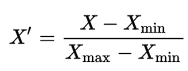
where X is an original value, X' is the normalized value. The formula sets the max value in the dataset to 1, and sets the min value to 0. The rest of the datapoints are scaled to a value between 0-1 accordingly.
# normalize Brazil data
norm_brazil = (df_can_t['Brazil'] - df_can_t['Brazil'].min()) / (df_can_t['Brazil'].max() - df_can_t['Brazil'].min())

# normalize Argentina data
norm_argentina = (df_can_t['Argentina'] - df_can_t['Argentina'].min()) / (df_can_t['Argentina'].max() - df_can_t['Argentina'].min())
Step 3: Plot the data.
- To plot two different scatter plots in one plot, we can include the axes one plot into the other by passing it via the
axparameter. - We will also pass in the weights using the
sparameter. Given that the normalized weights are between 0-1, they won't be visible on the plot. Therefore we will:- multiply weights by 2000 to scale it up on the graph, and,
- add 10 to compensate for the min value (which has a 0 weight and therefore scale with x2000).
# Brazil
ax0 = df_can_t.plot(kind='scatter',
                    x='Year',
                    y='Brazil',
                    figsize=(14, 8),
                    alpha=0.5,                  # transparency
                    color='green',
                    s=norm_brazil * 2000 + 10,  # pass in weights
                    xlim=(1975, 2015)
                   )

# Argentina
ax1 = df_can_t.plot(kind='scatter',
                    x='Year',
                    y='Argentina',
                    alpha=0.5,
                    color="blue",
                    s=norm_argentina * 2000 + 10,
                    ax = ax0
                   )

ax0.set_ylabel('Number of Immigrants')
ax0.set_title('Immigration from Brazil and Argentina from 1980 - 2013')
ax0.legend(['Brazil', 'Argentina'], loc='upper left', fontsize='x-large')
<matplotlib.legend.Legend at 0x236842328e0>

The size of the bubble corresponds to the magnitude of immigrating population for that year, compared to the 1980 - 2013 data. The larger the bubble, the more immigrants in that year.
From the plot above, we can see a corresponding increase in immigration from Argentina during the 1998 - 2002 great depression. We can also observe a similar spike around 1985 to 1993. In fact, Argentina had suffered a great depression from 1974 - 1990, just before the onset of 1998 - 2002 great depression.
On a similar note, Brazil suffered the Samba Effect where the Brazilian real (currency) dropped nearly 35% in 1999. There was a fear of a South American financial crisis as many South American countries were heavily dependent on industrial exports from Brazil. The Brazilian government subsequently adopted an austerity program, and the economy slowly recovered over the years, culminating in a surge in 2010. The immigration data reflect these events.
Question: Previously in this lab, we created box plots to compare immigration from China and India to Canada. Create bubble plots of immigration from China and India to visualize any differences with time from 1980 to 2013. You can use df_can_t that we defined and used in the previous example.
Step 1: Normalize the data pertaining to China and India.
Click here for a sample python solution
    #The correct answer is:

    # normalize China data
    norm_china = (df_can_t['China'] - df_can_t['China'].min()) / (df_can_t['China'].max() - df_can_t['China'].min())
    # normalize India data
    norm_india = (df_can_t['India'] - df_can_t['India'].min()) / (df_can_t['India'].max() - df_can_t['India'].min())
Step 2: Generate the bubble plots.
### type your answer here


# China
ax0 = df_can_t.plot(kind='scatter',
                    x='Year',
                    y='China',
                    figsize=(14, 8),
                    alpha=0.5,                  # transparency
                    color='green',
                    s=norm_china * 2000 + 10,  # pass in weights
                    xlim=(1975, 2015)
                   )

# India
ax1 = df_can_t.plot(kind='scatter',
                    x='Year',
                    y='India',
                    alpha=0.5,
                    color="blue",
                    s=norm_india * 2000 + 10,
                    ax = ax0
                   )

ax0.set_ylabel('Number of Immigrants')
ax0.set_title('Immigration from China and India from 1980 - 2013')
ax0.legend(['China', 'India'], loc='upper left', fontsize='x-large')
<matplotlib.legend.Legend at 0x23683c7b250>

Click here for a sample python solution
    #The correct answer is:

    # China
    ax0 = df_can_t.plot(kind='scatter',
                        x='Year',
                        y='China',
                        figsize=(14, 8),
                        alpha=0.5,                  # transparency
                        color='green',
                        s=norm_china * 2000 + 10,  # pass in weights
                        xlim=(1975, 2015)
                       )

    # India
    ax1 = df_can_t.plot(kind='scatter',
                        x='Year',
                        y='India',
                        alpha=0.5,
                        color="blue",
                        s=norm_india * 2000 + 10,
                        ax = ax0
                       )

    ax0.set_ylabel('Number of Immigrants')
    ax0.set_title('Immigration from China and India from 1980 - 2013')
    ax0.legend(['China', 'India'], loc='upper left', fontsize='x-large')
Reflections & Next Steps
This project was a chance for me to experiment with different types of plots and see what insights I could uncover. Each visualization told a different part of the story, and I learned a lot about both the data and the tools. If you have feedback or want to share your own visualizations, I'd love to connect!