SpaceX Falcon 9 First Stage Landing Analysis
Project by Mohammad Sayem Chowdhury
Data Wrangling and Preparation
Estimated time: About 1 hour (may vary depending on your pace)
In this notebook, I will explore and clean the SpaceX Falcon 9 launch data to prepare it for machine learning. The goal is to understand the different landing outcomes and create a clear label for successful vs. unsuccessful landings. This will help in building predictive models later.
The dataset includes various outcomes, such as landings in the ocean, on drone ships, or on ground pads. Some landings are successful, while others are not. For this project, I will simplify these outcomes into two categories: 1 for a successful landing and 0 for an unsuccessful one.
What makes a Falcon 9 landing successful?
Below, I will also highlight some examples of unsuccessful landings, which are important for understanding the challenges SpaceX faces.
My Objectives
- Explore and analyze the SpaceX Falcon 9 launch data
- Define clear training labels for machine learning
- Document my own findings and insights
Notebook by Mohammad Sayem Chowdhury
Import Libraries and Define Auxiliary Functions
We will import the following libraries.
# Pandas is a software library written for the Python programming language for data manipulation and analysis.
import pandas as pd
#NumPy is a library for the Python programming language, adding support for large, multi-dimensional arrays and matrices, along with a large collection of high-level mathematical functions to operate on these arrays
import numpy as np
Data Analysis
Load Space X dataset, from last section.
df=pd.read_csv("https://cf-courses-data.s3.us.cloud-object-storage.appdomain.cloud/IBM-DS0321EN-SkillsNetwork/datasets/dataset_part_1.csv")
df.head(10)
| FlightNumber | Date | BoosterVersion | PayloadMass | Orbit | LaunchSite | Outcome | Flights | GridFins | Reused | Legs | LandingPad | Block | ReusedCount | Serial | Longitude | Latitude | |
|---|---|---|---|---|---|---|---|---|---|---|---|---|---|---|---|---|---|
| 0 | 1 | 2010-06-04 | Falcon 9 | 6104.959412 | LEO | CCAFS SLC 40 | None None | 1 | False | False | False | NaN | 1.0 | 0 | B0003 | -80.577366 | 28.561857 |
| 1 | 2 | 2012-05-22 | Falcon 9 | 525.000000 | LEO | CCAFS SLC 40 | None None | 1 | False | False | False | NaN | 1.0 | 0 | B0005 | -80.577366 | 28.561857 |
| 2 | 3 | 2013-03-01 | Falcon 9 | 677.000000 | ISS | CCAFS SLC 40 | None None | 1 | False | False | False | NaN | 1.0 | 0 | B0007 | -80.577366 | 28.561857 |
| 3 | 4 | 2013-09-29 | Falcon 9 | 500.000000 | PO | VAFB SLC 4E | False Ocean | 1 | False | False | False | NaN | 1.0 | 0 | B1003 | -120.610829 | 34.632093 |
| 4 | 5 | 2013-12-03 | Falcon 9 | 3170.000000 | GTO | CCAFS SLC 40 | None None | 1 | False | False | False | NaN | 1.0 | 0 | B1004 | -80.577366 | 28.561857 |
| 5 | 6 | 2014-01-06 | Falcon 9 | 3325.000000 | GTO | CCAFS SLC 40 | None None | 1 | False | False | False | NaN | 1.0 | 0 | B1005 | -80.577366 | 28.561857 |
| 6 | 7 | 2014-04-18 | Falcon 9 | 2296.000000 | ISS | CCAFS SLC 40 | True Ocean | 1 | False | False | True | NaN | 1.0 | 0 | B1006 | -80.577366 | 28.561857 |
| 7 | 8 | 2014-07-14 | Falcon 9 | 1316.000000 | LEO | CCAFS SLC 40 | True Ocean | 1 | False | False | True | NaN | 1.0 | 0 | B1007 | -80.577366 | 28.561857 |
| 8 | 9 | 2014-08-05 | Falcon 9 | 4535.000000 | GTO | CCAFS SLC 40 | None None | 1 | False | False | False | NaN | 1.0 | 0 | B1008 | -80.577366 | 28.561857 |
| 9 | 10 | 2014-09-07 | Falcon 9 | 4428.000000 | GTO | CCAFS SLC 40 | None None | 1 | False | False | False | NaN | 1.0 | 0 | B1011 | -80.577366 | 28.561857 |
Identify and calculate the percentage of the missing values in each attribute
df.isnull().sum()/len(df)*100
FlightNumber       0.000000
Date               0.000000
BoosterVersion     0.000000
PayloadMass        0.000000
Orbit              0.000000
LaunchSite         0.000000
Outcome            0.000000
Flights            0.000000
GridFins           0.000000
Reused             0.000000
Legs               0.000000
LandingPad        28.888889
Block              0.000000
ReusedCount        0.000000
Serial             0.000000
Longitude          0.000000
Latitude           0.000000
dtype: float64
Identify which columns are numerical and categorical:
df.dtypes
FlightNumber        int64
Date               object
BoosterVersion     object
PayloadMass       float64
Orbit              object
LaunchSite         object
Outcome            object
Flights             int64
GridFins             bool
Reused               bool
Legs                 bool
LandingPad         object
Block             float64
ReusedCount         int64
Serial             object
Longitude         float64
Latitude          float64
dtype: object
TASK 1: Calculate the number of launches on each site
The data contains several Space X launch facilities: Cape Canaveral Space Launch Complex 40 VAFB SLC 4E , Vandenberg Air Force Base Space Launch Complex 4E (SLC-4E), Kennedy Space Center Launch Complex 39A KSC LC 39A .The location of each Launch Is placed in the column LaunchSite
Next, let's see the number of launches for each site.
Use the method value_counts() on the column LaunchSite to determine the number of launches on each site:
# Apply value_counts() on column LaunchSite
df["LaunchSite"].value_counts()
CCAFS SLC 40    55
KSC LC 39A      22
VAFB SLC 4E     13
Name: LaunchSite, dtype: int64
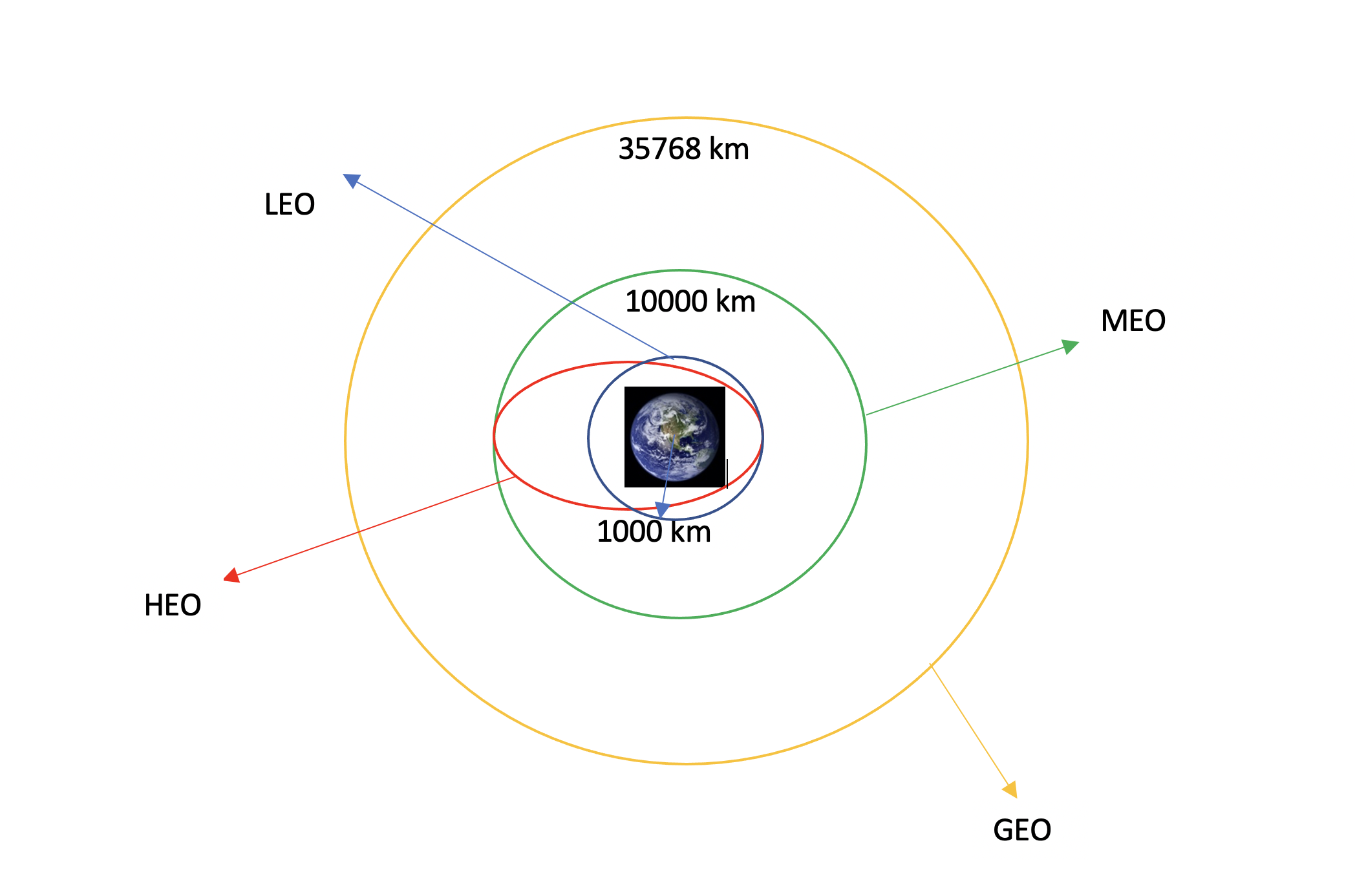
Each launch aims to an dedicated orbit, and here are some common orbit types:
LEO: Low Earth orbit (LEO)is an Earth-centred orbit with an altitude of 2,000 km (1,200 mi) or less (approximately one-third of the radius of Earth),[1] or with at least 11.25 periods per day (an orbital period of 128 minutes or less) and an eccentricity less than 0.25.[2] Most of the manmade objects in outer space are in LEO [1].
VLEO: Very Low Earth Orbits (VLEO) can be defined as the orbits with a mean altitude below 450 km. Operating in these orbits can provide a number of benefits to Earth observation spacecraft as the spacecraft operates closer to the observation[2].
GTO A geosynchronous orbit is a high Earth orbit that allows satellites to match Earth's rotation. Located at 22,236 miles (35,786 kilometers) above Earth's equator, this position is a valuable spot for monitoring weather, communications and surveillance. Because the satellite orbits at the same speed that the Earth is turning, the satellite seems to stay in place over a single longitude, though it may drift north to south,” NASA wrote on its Earth Observatory website [3] .
SSO (or SO): It is a Sun-synchronous orbit also called a heliosynchronous orbit is a nearly polar orbit around a planet, in which the satellite passes over any given point of the planet's surface at the same local mean solar time [4] .
ES-L1 :At the Lagrange points the gravitational forces of the two large bodies cancel out in such a way that a small object placed in orbit there is in equilibrium relative to the center of mass of the large bodies. L1 is one such point between the sun and the earth [5] .
HEO A highly elliptical orbit, is an elliptic orbit with high eccentricity, usually referring to one around Earth [6].
ISS A modular space station (habitable artificial satellite) in low Earth orbit. It is a multinational collaborative project between five participating space agencies: NASA (United States), Roscosmos (Russia), JAXA (Japan), ESA (Europe), and CSA (Canada) [7]
MEO Geocentric orbits ranging in altitude from 2,000 km (1,200 mi) to just below geosynchronous orbit at 35,786 kilometers (22,236 mi). Also known as an intermediate circular orbit. These are "most commonly at 20,200 kilometers (12,600 mi), or 20,650 kilometers (12,830 mi), with an orbital period of 12 hours [8]
HEO Geocentric orbits above the altitude of geosynchronous orbit (35,786 km or 22,236 mi) [9]
GEO It is a circular geosynchronous orbit 35,786 kilometres (22,236 miles) above Earth's equator and following the direction of Earth's rotation [10]
PO It is one type of satellites in which a satellite passes above or nearly above both poles of the body being orbited (usually a planet such as the Earth [11]
some are shown in the following plot:
TASK 2: Calculate the number and occurrence of each orbit
Use the method .value_counts() to determine the number and occurrence of each orbit in the column Orbit
# Apply value_counts on Orbit column
df["Orbit"].value_counts()
GTO      27
ISS      21
VLEO     14
PO        9
LEO       7
SSO       5
MEO       3
ES-L1     1
HEO       1
SO        1
GEO       1
Name: Orbit, dtype: int64
TASK 3: Calculate the number and occurence of mission outcome of the orbits
Use the method .value_counts() on the column Outcome to determine the number of landing_outcomes.Then assign it to a variable landing_outcomes.
# landing_outcomes = values on Outcome column
landing_outcomes = df["Outcome"].value_counts()
True Ocean means the mission outcome was successfully landed to a specific region of the ocean while False Ocean means the mission outcome was unsuccessfully landed to a specific region of the ocean. True RTLS means the mission outcome was successfully landed to a ground pad False RTLS means the mission outcome was unsuccessfully landed to a ground pad.True ASDS means the mission outcome was successfully landed to a drone ship False ASDS means the mission outcome was unsuccessfully landed to a drone ship. None ASDS and None None these represent a failure to land.
for i,outcome in enumerate(landing_outcomes.keys()):
    print(i,outcome)
0 True ASDS
1 None None
2 True RTLS
3 False ASDS
4 True Ocean
5 False Ocean
6 None ASDS
7 False RTLS
We create a set of outcomes where the second stage did not land successfully:
bad_outcomes=set(landing_outcomes.keys()[[1,3,5,6,7]])
bad_outcomes
{'False ASDS', 'False Ocean', 'False RTLS', 'None ASDS', 'None None'}
TASK 4: Create a landing outcome label from Outcome column
Using the Outcome, create a list where the element is zero if the corresponding row in Outcome is in the set bad_outcome; otherwise, it's one. Then assign it to the variable landing_class:
# Create a list where the element is zero if the corresponding row in Outcome is in the set bad_outcome; otherwise, it's one
landing_class = [0 if outcome in bad_outcomes else 1 for outcome in df['Outcome']]
This variable will represent the classification variable that represents the outcome of each launch. If the value is zero, the first stage did not land successfully; one means the first stage landed Successfully
df['Class']=landing_class
df[['Class']].head(8)
| Class | |
|---|---|
| 0 | 0 |
| 1 | 0 |
| 2 | 0 |
| 3 | 0 |
| 4 | 0 |
| 5 | 0 |
| 6 | 1 |
| 7 | 1 |
df.head(5)
| FlightNumber | Date | BoosterVersion | PayloadMass | Orbit | LaunchSite | Outcome | Flights | GridFins | Reused | Legs | LandingPad | Block | ReusedCount | Serial | Longitude | Latitude | Class | |
|---|---|---|---|---|---|---|---|---|---|---|---|---|---|---|---|---|---|---|
| 0 | 1 | 2010-06-04 | Falcon 9 | 6104.959412 | LEO | CCAFS SLC 40 | None None | 1 | False | False | False | NaN | 1.0 | 0 | B0003 | -80.577366 | 28.561857 | 0 |
| 1 | 2 | 2012-05-22 | Falcon 9 | 525.000000 | LEO | CCAFS SLC 40 | None None | 1 | False | False | False | NaN | 1.0 | 0 | B0005 | -80.577366 | 28.561857 | 0 |
| 2 | 3 | 2013-03-01 | Falcon 9 | 677.000000 | ISS | CCAFS SLC 40 | None None | 1 | False | False | False | NaN | 1.0 | 0 | B0007 | -80.577366 | 28.561857 | 0 |
| 3 | 4 | 2013-09-29 | Falcon 9 | 500.000000 | PO | VAFB SLC 4E | False Ocean | 1 | False | False | False | NaN | 1.0 | 0 | B1003 | -120.610829 | 34.632093 | 0 |
| 4 | 5 | 2013-12-03 | Falcon 9 | 3170.000000 | GTO | CCAFS SLC 40 | None None | 1 | False | False | False | NaN | 1.0 | 0 | B1004 | -80.577366 | 28.561857 | 0 |
We can use the following line of code to determine the success rate:
df["Class"].mean()
0.6666666666666666
We can now export it to a CSV for the next section,but to make the answers consistent, in the next lab we will provide data in a pre-selected date range.
df.to_csv("dataset_part_2.csv", index=False)
df.to_csv("dataset_part_2.csv", index=False)
Authors
Joseph Santarcangelo has a PhD in Electrical Engineering, his research focused on using machine learning, signal processing, and computer vision to determine how videos impact human cognition. Joseph has been working for IBM since he completed his PhD.
Nayef Abou Tayoun is a Data Scientist at IBM and pursuing a Master of Management in Artificial intelligence degree at Queen's University.
Change Log
| Date (YYYY-MM-DD) | Version | Changed By | Change Description |
|---|---|---|---|
| 2021-08-31 | 1.1 | Lakshmi Holla | Changed Markdown |
| 2020-09-20 | 1.0 | Joseph | Modified Multiple Areas |
| 2020-11-04 | 1.1. | Nayef | updating the input data |
| 2021-05-026 | 1.1. | Joseph | updating the input data |
Copyright © 2021 IBM Corporation. All rights reserved.
from google.colab import drive
drive.mount('/content/drive')
Mounted at /content/drive
!pip install dash
Collecting dash
  Downloading dash-2.15.0-py3-none-any.whl (10.2 MB)
     ━━━━━━━━━━━━━━━━━━━━━━━━━━━━━━━━━━━━━━━━ 10.2/10.2 MB 32.2 MB/s eta 0:00:00
Requirement already satisfied: Flask<3.1,>=1.0.4 in /usr/local/lib/python3.10/dist-packages (from dash) (2.2.5)
Requirement already satisfied: Werkzeug<3.1 in /usr/local/lib/python3.10/dist-packages (from dash) (3.0.1)
Requirement already satisfied: plotly>=5.0.0 in /usr/local/lib/python3.10/dist-packages (from dash) (5.15.0)
Collecting dash-html-components==2.0.0 (from dash)
  Downloading dash_html_components-2.0.0-py3-none-any.whl (4.1 kB)
Collecting dash-core-components==2.0.0 (from dash)
  Downloading dash_core_components-2.0.0-py3-none-any.whl (3.8 kB)
Collecting dash-table==5.0.0 (from dash)
  Downloading dash_table-5.0.0-py3-none-any.whl (3.9 kB)
Requirement already satisfied: typing-extensions>=4.1.1 in /usr/local/lib/python3.10/dist-packages (from dash) (4.9.0)
Requirement already satisfied: requests in /usr/local/lib/python3.10/dist-packages (from dash) (2.31.0)
Collecting retrying (from dash)
  Downloading retrying-1.3.4-py3-none-any.whl (11 kB)
Requirement already satisfied: nest-asyncio in /usr/local/lib/python3.10/dist-packages (from dash) (1.6.0)
Requirement already satisfied: setuptools in /usr/local/lib/python3.10/dist-packages (from dash) (67.7.2)
Requirement already satisfied: importlib-metadata in /usr/local/lib/python3.10/dist-packages (from dash) (7.0.1)
Requirement already satisfied: Jinja2>=3.0 in /usr/local/lib/python3.10/dist-packages (from Flask<3.1,>=1.0.4->dash) (3.1.3)
Requirement already satisfied: itsdangerous>=2.0 in /usr/local/lib/python3.10/dist-packages (from Flask<3.1,>=1.0.4->dash) (2.1.2)
Requirement already satisfied: click>=8.0 in /usr/local/lib/python3.10/dist-packages (from Flask<3.1,>=1.0.4->dash) (8.1.7)
Requirement already satisfied: tenacity>=6.2.0 in /usr/local/lib/python3.10/dist-packages (from plotly>=5.0.0->dash) (8.2.3)
Requirement already satisfied: packaging in /usr/local/lib/python3.10/dist-packages (from plotly>=5.0.0->dash) (23.2)
Requirement already satisfied: MarkupSafe>=2.1.1 in /usr/local/lib/python3.10/dist-packages (from Werkzeug<3.1->dash) (2.1.5)
Requirement already satisfied: zipp>=0.5 in /usr/local/lib/python3.10/dist-packages (from importlib-metadata->dash) (3.17.0)
Requirement already satisfied: charset-normalizer<4,>=2 in /usr/local/lib/python3.10/dist-packages (from requests->dash) (3.3.2)
Requirement already satisfied: idna<4,>=2.5 in /usr/local/lib/python3.10/dist-packages (from requests->dash) (3.6)
Requirement already satisfied: urllib3<3,>=1.21.1 in /usr/local/lib/python3.10/dist-packages (from requests->dash) (2.0.7)
Requirement already satisfied: certifi>=2017.4.17 in /usr/local/lib/python3.10/dist-packages (from requests->dash) (2024.2.2)
Requirement already satisfied: six>=1.7.0 in /usr/local/lib/python3.10/dist-packages (from retrying->dash) (1.16.0)
Installing collected packages: dash-table, dash-html-components, dash-core-components, retrying, dash
Successfully installed dash-2.15.0 dash-core-components-2.0.0 dash-html-components-2.0.0 dash-table-5.0.0 retrying-1.3.4
# Import required libraries
import pandas as pd
import dash
import dash_html_components as html
import dash_core_components as dcc
from dash.dependencies import Input, Output
import plotly.express as px

# Read the airline data into pandas dataframe
spacex_df = pd.read_csv("/content/drive/MyDrive/IBM Data Science Capstone/spacex_launch_dash.csv")
max_payload = spacex_df['Payload Mass (kg)'].max()
min_payload = spacex_df['Payload Mass (kg)'].min()

# Create a dash application
app = dash.Dash(__name__)

# Create an app layout
app.layout = html.Div(children=[html.H1('SpaceX Launch Records Dashboard',
                                        style={'textAlign': 'center', 'color': '#503D36',
                                               'font-size': 40}),
                                # Complete the commented dcc.Dropdown() input with the following attributes:
                                # - id: site-dropdown
                                # - options: list of dictionaries with label and value attributes for each launch site, including the default 'All Sites' option
                                # - value: default dropdown value set to 'ALL'
                                # - placeholder: text description to show in the input area, such as 'Select a Launch Site here'
                                # - searchable: set to True to enable searching launch sites

                                html.Div([
                                    dcc.Dropdown(
                                        id='site-dropdown',
                                        options=[{'label': 'All Sites', 'value': 'ALL'}] + [{'label': site, 'value': site} for site in spacex_df['Launch Site'].unique()],
                                        value='ALL',
                                        placeholder="Select a Launch Site here",
                                        searchable=True
                                    ),
                                    html.Br()
                                ]),


                                # TASK 2: Add a pie chart to show the total successful launches count for all sites
                                # If a specific launch site was selected, show the Success vs. Failed counts for the site
                                html.Div(dcc.Graph(id='success-pie-chart')),
                                html.Br(),

                                html.P("Payload range (Kg):"),
                                # TASK 3: Add a slider to select payload range
                                #dcc.RangeSlider(id='payload-slider',...)
                                # Here is an example of a RangeSlider input component for selecting payload range:

                                dcc.RangeSlider(id='payload-slider',
                                                min=0, max=10000, step=1000,
                                                marks={0: '0', 10000: '10000'},
                                                value=[min_payload, max_payload]),
                                html.Br(),

                                # TASK 4: Add a scatter chart to show the correlation between payload and launch success
                                html.Div(dcc.Graph(id='success-payload-scatter-chart')),
                                ])

# TASK 2:
# Add a callback function for `site-dropdown` as input, `success-pie-chart` as output
# Here is an example of a callback function for generating a pie chart based on the selected launch site:

# Function decorator to specify function input and output
@app.callback(Output(component_id='success-pie-chart', component_property='figure'),
              Input(component_id='site-dropdown', component_property='value'))
def get_pie_chart(entered_site):
    filtered_df = spacex_df
    if entered_site != 'ALL':
        filtered_df = spacex_df[spacex_df['Launch Site'] == entered_site]

    # Count the number of successful and failed launches
    success_count = filtered_df[filtered_df['class'] == 1]['class'].count()
    failure_count = filtered_df[filtered_df['class'] == 0]['class'].count()

    # Create the pie chart figure
    fig = px.pie(names=['Success', 'Failure'],
                 values=[success_count, failure_count],
                 title='Success vs. Failure Counts')

    return fig

# TASK 4:
# Add a callback function for `site-dropdown` and `payload-slider` as inputs, `success-payload-scatter-chart` as output
# Here is an example of a callback function for rendering the success-payload-scatter-chart scatter plot:

@app.callback(
    Output(component_id='success-payload-scatter-chart', component_property='figure'),
    [Input(component_id='site-dropdown', component_property='value'), Input(component_id="payload-slider", component_property="value")]
)
def update_scatter_chart(selected_site, payload_range):
    if selected_site == 'ALL':
        filtered_df = spacex_df[(spacex_df['Payload Mass (kg)'] >= payload_range[0]) & (spacex_df['Payload Mass (kg)'] <= payload_range[1])]
        fig = px.scatter(filtered_df, x='Payload Mass (kg)', y='class', color='Booster Version Category', title='Payload Success Rate for All Sites')
        return fig
    else:
        filtered_df = spacex_df[(spacex_df['Launch Site'] == selected_site) & (spacex_df['Payload Mass (kg)'] >= payload_range[0]) & (spacex_df['Payload Mass (kg)'] <= payload_range[1])]
        fig = px.scatter(filtered_df, x='Payload Mass (kg)', y='class', color='Booster Version Category', title=f'Payload Success Rate for {selected_site}')
        return fig


# Run the app
if __name__ == '__main__':
    app.run_server()
<ipython-input-4-c6cb0111a812>:4: UserWarning:
The dash_html_components package is deprecated. Please replace
`import dash_html_components as html` with `from dash import html`
  import dash_html_components as html
<ipython-input-4-c6cb0111a812>:5: UserWarning:
The dash_core_components package is deprecated. Please replace
`import dash_core_components as dcc` with `from dash import dcc`
  import dash_core_components as dcc
spacex_df
| Unnamed: 0 | Flight Number | Launch Site | class | Payload Mass (kg) | Booster Version | Booster Version Category | |
|---|---|---|---|---|---|---|---|
| 0 | 0 | 1 | CCAFS LC-40 | 0 | 0.00 | F9 v1.0 B0003 | v1.0 |
| 1 | 1 | 2 | CCAFS LC-40 | 0 | 0.00 | F9 v1.0 B0004 | v1.0 |
| 2 | 2 | 3 | CCAFS LC-40 | 0 | 525.00 | F9 v1.0 B0005 | v1.0 |
| 3 | 3 | 4 | CCAFS LC-40 | 0 | 500.00 | F9 v1.0 B0006 | v1.0 |
| 4 | 4 | 5 | CCAFS LC-40 | 0 | 677.00 | F9 v1.0 B0007 | v1.0 |
| 5 | 5 | 7 | CCAFS LC-40 | 0 | 3170.00 | F9 v1.1 | v1.1 |
| 6 | 6 | 8 | CCAFS LC-40 | 0 | 3325.00 | F9 v1.1 | v1.1 |
| 7 | 7 | 9 | CCAFS LC-40 | 0 | 2296.00 | F9 v1.1 | v1.1 |
| 8 | 8 | 10 | CCAFS LC-40 | 0 | 1316.00 | F9 v1.1 | v1.1 |
| 9 | 9 | 11 | CCAFS LC-40 | 0 | 4535.00 | F9 v1.1 | v1.1 |
| 10 | 10 | 12 | CCAFS LC-40 | 0 | 4428.00 | F9 v1.1 B1011 | v1.1 |
| 11 | 11 | 13 | CCAFS LC-40 | 0 | 2216.00 | F9 v1.1 B1010 | v1.1 |
| 12 | 12 | 14 | CCAFS LC-40 | 0 | 2395.00 | F9 v1.1 B1012 | v1.1 |
| 13 | 13 | 15 | CCAFS LC-40 | 0 | 570.00 | F9 v1.1 B1013 | v1.1 |
| 14 | 14 | 16 | CCAFS LC-40 | 0 | 4159.00 | F9 v1.1 B1014 | v1.1 |
| 15 | 15 | 17 | CCAFS LC-40 | 0 | 1898.00 | F9 v1.1 B1015 | v1.1 |
| 16 | 16 | 18 | CCAFS LC-40 | 0 | 4707.00 | F9 v1.1 B1016 | v1.1 |
| 17 | 17 | 19 | CCAFS LC-40 | 1 | 1952.00 | F9 v1.1 B1018 | v1.1 |
| 18 | 18 | 20 | CCAFS LC-40 | 1 | 2034.00 | F9 FT B1019 | FT |
| 19 | 19 | 22 | CCAFS LC-40 | 0 | 5271.00 | F9 FT B1020 | FT |
| 20 | 20 | 23 | CCAFS LC-40 | 1 | 3136.00 | F9 FT B1021.1 | FT |
| 21 | 21 | 24 | CCAFS LC-40 | 1 | 4696.00 | F9 FT B1022 | FT |
| 22 | 22 | 25 | CCAFS LC-40 | 1 | 3100.00 | F9 FT B1023.1 | FT |
| 23 | 23 | 26 | CCAFS LC-40 | 0 | 3600.00 | F9 FT B1024 | FT |
| 24 | 24 | 27 | CCAFS LC-40 | 1 | 2257.00 | F9 FT B1025.1 | FT |
| 25 | 25 | 28 | CCAFS LC-40 | 1 | 4600.00 | F9 FT B1026 | FT |
| 26 | 26 | 6 | VAFB SLC-4E | 0 | 500.00 | F9 v1.1 B1003 | v1.1 |
| 27 | 27 | 21 | VAFB SLC-4E | 0 | 553.00 | F9 v1.1 B1017 | v1.1 |
| 28 | 28 | 29 | VAFB SLC-4E | 1 | 9600.00 | F9 FT B1029.1 | FT |
| 29 | 29 | 37 | VAFB SLC-4E | 1 | 9600.00 | F9 FT B1036.1 | FT |
| 30 | 30 | 40 | VAFB SLC-4E | 1 | 475.00 | F9 FT B1038.1 | FT |
| 31 | 31 | 42 | VAFB SLC-4E | 1 | 9600.00 | F9 B4 B1041.1 | B4 |
| 32 | 32 | 46 | VAFB SLC-4E | 0 | 9600.00 | F9 FT B1036.2 | FT |
| 33 | 33 | 49 | VAFB SLC-4E | 0 | 2150.00 | F9 FT B1038.2 | FT |
| 34 | 34 | 51 | VAFB SLC-4E | 0 | 9600.00 | F9 B4 B1041.2 | B4 |
| 35 | 35 | 55 | VAFB SLC-4E | 0 | 6460.00 | F9 B4 B1043.2 | B4 |
| 36 | 36 | 30 | KSC LC-39A | 1 | 2490.00 | F9 FT B1031.1 | FT |
| 37 | 37 | 31 | KSC LC-39A | 0 | 5600.00 | F9 FT B1030 | FT |
| 38 | 38 | 32 | KSC LC-39A | 1 | 5300.00 | F9 FT B1021.2 | FT |
| 39 | 39 | 33 | KSC LC-39A | 1 | 3696.65 | F9 FT B1032.1 | FT |
| 40 | 40 | 34 | KSC LC-39A | 0 | 6070.00 | F9 FT B1034 | FT |
| 41 | 41 | 35 | KSC LC-39A | 1 | 2708.00 | F9 FT B1035.1 | FT |
| 42 | 42 | 36 | KSC LC-39A | 1 | 3669.00 | F9 FT B1029.2 | FT |
| 43 | 43 | 38 | KSC LC-39A | 0 | 6761.00 | F9 FT B1037 | FT |
| 44 | 44 | 39 | KSC LC-39A | 1 | 3310.00 | F9 B4 B1039.1 | B4 |
| 45 | 45 | 41 | KSC LC-39A | 1 | 4990.00 | F9 B4 B1040.1 | B4 |
| 46 | 46 | 43 | KSC LC-39A | 1 | 5200.00 | F9 FT B1031.2 | FT |
| 47 | 47 | 44 | KSC LC-39A | 1 | 3500.00 | F9 B4 B1042.1 | B4 |
| 48 | 48 | 54 | KSC LC-39A | 1 | 3600.00 | F9 B5 B1046.1 | B5 |
| 49 | 49 | 45 | CCAFS SLC-40 | 1 | 2205.00 | F9 FT B1035.2 | FT |
| 50 | 50 | 47 | CCAFS SLC-40 | 1 | 3696.65 | F9 B4 B1043.1 | B4 |
| 51 | 51 | 48 | CCAFS SLC-40 | 0 | 4230.00 | F9 FT B1032.2 | FT |
| 52 | 52 | 50 | CCAFS SLC-40 | 0 | 6092.00 | F9 B4 B1044 | B4 |
| 53 | 53 | 52 | CCAFS SLC-40 | 0 | 2647.00 | F9 B4 B1039.2 | B4 |
| 54 | 54 | 53 | CCAFS SLC-40 | 1 | 362.00 | F9 B4 B1045.1 | B4 |
| 55 | 55 | 56 | CCAFS SLC-40 | 0 | 5384.00 | F9 B4 B1040.2 | B4 |